
Paying Invoices
Finding invoices
Invoices are issued by Boat Safety Scheme Limited
BSS Ltd is public safety initiative run as a not-for-profit company limited by guarantee. It is registered in England and Wales with Company No. 15501423. The registered office is: National Waterways Museum Ellesmere Port South Pier Road Ellesmere Port Cheshire CH65 4FW
Boat Safety Scheme Limited is registered within a Canal & River Trust VAT group, registration number 125 5119 37, approved by HMRC.
Finding your invoices: routes 1 - 3
Route 1) – simple search
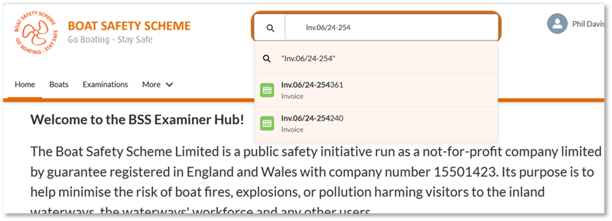
If you have the either the invoice reference or invoice number, use the search bar at the top of the BSS Examiner Hub page and type in the BSS invoice reference number, click on the record name when you see it pop up (see image below)
Route 2) – navigate to all invoices
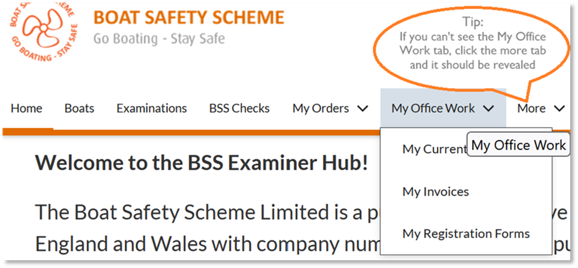
Go to the My Office Work tab
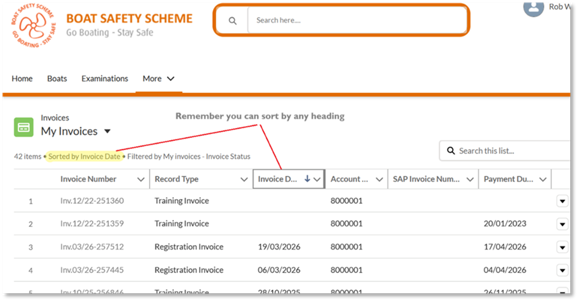
To open a list of your invoices:
- click on the My Office Work tab
- select the My Invoices menu item
- select the list view
- if needed – you can organise your list in the way you wish
Route 3) – recently viewed records pop-up in search
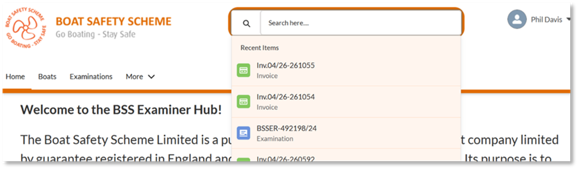
A tip for all Examiner Hub records, they pop in the orange framed search bar as soon as you drop your cursor into the frame, even before typing in any characters. So, if you are seeking a record, you have landed on recently, it should appear in the drop-down menu
Exploring your invoices
This image points to important features of your invoice page layout when making payments to Boat Safety Scheme Limited.
We provide the topline or at-a-glance information so you can immediate see all the critical information either supporting a need to make payment or identifying that this invoice has been paid.
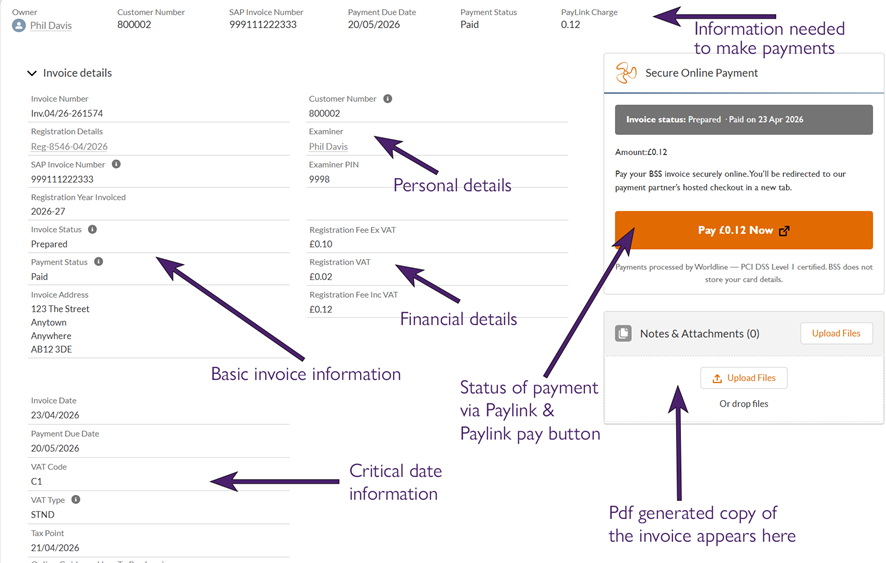
As always, you can generate a pdf copy of an invoice by clicking on the Create ‘ ‘ Invoice button on the right of the page just underneath the bar across the top of the page.

The invoice file will land, and can be downloaded from, the file download section.
Paying invoices
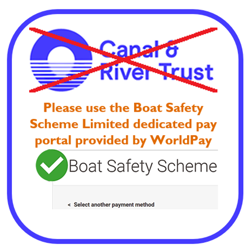
Use this Boat Safety Scheme Limited dedicated PayLink Portal provided by WorldPay


This is the best way to pay as you will get an automated receipt, and it will immediately trigger a field in the Examiner Hub invoice record to show it is paid. No other payment methods will do this immediately.
It is also the most convenient way to pay related to time. You can make payment as and when it is suitable for you to do, day or night, week days, weekends or bank holidays.
On the Invoice record in the Examiner Hub click the Pay £-.-- Now Link button (see the invoice page image above). Visa and Mastercard, debit and credit cards are accepted
This takes you to the new BSS Online Payment portal partner (Worldline), where you can enter your details and pay the invoice.
Check that the invoice number beginning with 9_ _ _ _ _ _ and the customer beginning with 8_ _ _ _ _ are correct.
Please note: You pay one invoice at a time, and you pay in full – no part payments are possible.
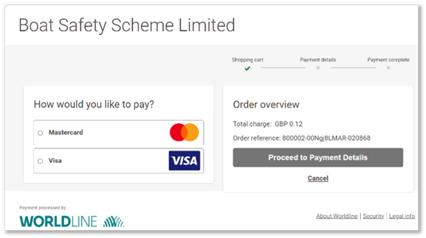
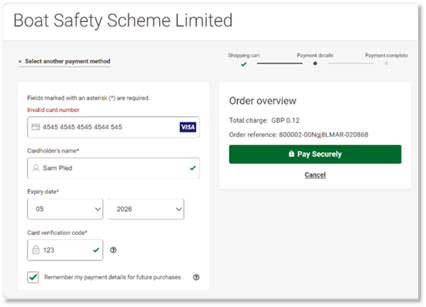
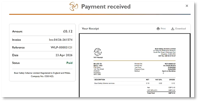
You will be taken through a set of security screens relevant to your bank brand. Assuming this runs smoothly you will then get a message of Payment Received and with the opportunity to view and download the receipt, as shown on the left below.
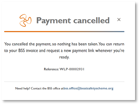
If you cancel the payment process, you will get the message as shown on the right below.
Please remember the next two points that must be adhered to whichever payment method you use:
- Always quote the SAP Invoice Number
- This is the seven-digit number that begins with 9_ _ _ _ _ _
- Note: the BSS invoice reference (e.g. Inv.05/13-100188) is only a cross reference
- Always quote your BSS customer number (this was previously called the Canal & River Trust customer number – it is the same number)
Your customer number can be found both on the upper left corner of your invoice printout and on the BSS Examiner Hub invoice page in the header and the personal details section of the invoice (see image above)
Alternative Payment Methods
Using these methods will not result in an immediate receipt and because it involves manual processes within both the Canal & River Trust and BSS Office, it may take several days or even weeks for the status of the invoice to change from unpaid to paid.
By Credit Card
You can pay by debit, or credit card over the phone, call our service partners at the Canal & River Trust on 0303 040 4040.
Please quote your invoice number and customer number when making a payment.
By Electronic Banking
To pay your invoice issued by Boat Safety Scheme Limited electronically, contact your bank or building society as appropriate, and quote
- Account Number: 48966444
- Customer Number - your reference starting with 8……….
You must quote these numbers on all electronic payments.
Query?
If any details have changed, or you have any queries in respect of this invoice, please contact the Shared Service Centre via:
[email protected]
Please quote your customer number and invoice number in all enquiries.
If you are paying by Direct Debit, the invoice print-out is for your records only.
Late Payments!
Where no higher rate of interest is specific in any contract between Boat Safety Scheme Limited and you may be charged interest at a rate of 8% above the Bank of England base rate on overdue amounts. The Boat Safety Scheme Limited reserves the right to claim debt recovery costs.
If the payment is not honoured by your bank, you may have to pay an additional handling charge of £20.